☰





In the Java programming language, strings are objects containing sequence of characters. Internally Strings are represented using bytes, encoded as UTF-16 which uses 2 bytes to represent a single character. An array of characters works same as java string.
String class is used to create string object. The java.lang.String class implements Serializable, Comparable and CharSequence interfaces.
The java String class is an immutable class. An immutable class is simply a class whose instances cannot be modified. All of the information contained in each instance is provided when it is created and is fixed for the lifetime of the object.
Immutable classes are
The Java platform provides the String class to create and manipulate strings. String can be created in many ways:
The most direct way to create a string is
String myString = "Core Java Guru";
In above "Core Java Guru", is a string literal, a series of characters that is enclosed in double quotes. Whenever it encounters a string literal in your code, the compiler creates a String object with its value-in the above case, Core Java Guru.
Like any other objects you need to use the new operator to create a new Java String object.
String myString = new String("Core Java Guru");
Now the variable myString will conatain "Core Java Guru", the text between the double quotes.
You can create string objects from other objects too. For example:
String myString = "Core Java Guru";
String myString2 = new String(myString);
char[] charArray = { 'c', 'o', 'r', 'e', ' ', 'j', 'a', 'v', 'a'};
String myString3 = new String(charArray);
System.out.println(myString2);
System.out.println(myString3);
Output will be:
Core Java Guru
core java
Strings are more commonly concatenated with the + operator and using this operator we can create a string like below:
String myString = "Core";
String myString2 = "Java";
String myString3 = "Guru";
String myFinalString = myString + myString2 + myString3;
System.out.println(myFinalString);
Output will be:
CoreJavaGuru
You can concatenate two or more string in 2 ways:
Strings are more commonly concatenated with the + operator, as in
String myString = "Core";
String myString2 = "Java";
String myString3 = "Guru";
String myFinalString = myString + myString2 + myString3;
System.out.println(myFinalString);
Output will be:
CoreJavaGuru
The String class includes a method called "concat" for concatenating two strings:
String myString1 = "Core";
String myString2 = "Java";
String myFinalString = myString1.concat(myString2);
System.out.println(myFinalString);
Output will be:
CoreJava
As you can see, concat operation returned a new string that is myString1 with myString2 added to it at the end.
You can also use the concat() method with string literals, like below:
"Core".concat("Java");
String allocation, like all object allocation, is costly in both time and memory. The JVM performs some tricky background work while instantiating string literals to increase performance and decrease memory overhead. To cut down the number of String objects created in the JVM, the String class keeps a pool of strings. Each time your code create a string literal, the JVM checks the string literal pool first. If the string already exists in the pool, a reference to the pooled instance returns. If the string does not exist in the pool, a new String object instantiates, then is placed in the pool. Java can make this optimization since strings are immutable and can be shared without fear of data corruption. For example:
When we create a new string object using string literal, JVM checks whether that string literal is present in string pool or not. If it is not present then it adds it to the pool.
String myString = "Core Java Guru";
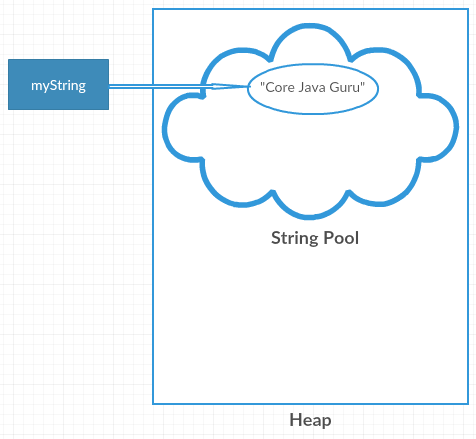
Now, when you create another string object with same string literal, then a reference of the string literal already present in string pool is returned.
String myString2 = myString;

And now if you change the literal in the new string, its reference gets modified. Remember String is a immutable class, means if you change the value, internally it is creating a new object and returning the reference.
myString2 = "Hi " + myString2;

If you create a new string using 'new' keyword, it creates object in heap rather than in string pool even if the same string literal is present in the pool.
String myString3 = new String("Core Java Guru");

There are three ways to compare string in java:
equals() method compares two strings for equality. It compares the content of the strings. It will return true if string matches, else returns false. String class provides two methods:
class Stringcomparison{
 public static void main(String args[]){
   String myString1="Java";
   String myString2="Java";
   String myString3=new String("Java");
   String myString4="Core";
   String myString5="JAVA";
   System.out.println(myString1.equals(myString2));  //true
   System.out.println(myString1.equals(myString3));  //true
   System.out.println(myString1.equals(myString4));  //false
   System.out.println(myString1.equalsIgnoreCase(myString5));  //true
 }
}
The == operator compares references not values. The == operator compares two object references to check whether they refer to same instance and it returns true if refer to same instance else false.
class Stringcomparison{
 public static void main(String args[]){
   String myString1="Java";
   String myString2="Java";
   String myString3=new String("Java");
   System.out.println(myString1==myString2); //true
   System.out.println(myString1==myString3); //false
 }
}
The code myString1==myString2 returns true because both refer to same instance in the string pool. The code myString1==myString3 returns false because myString3 refers to instance created in heap rather than string pool.
compareTo() method compares values and returns an int based on lexicographical comaparison. It returns an integer value that indicates if first string is less than, equal to or greater than second string. Like, if string1 and string2 are the 2 strings, then
Note: To use compareTo() function you have to implement the Comparable Interface.
class Stringcomparison{
 public static void main(String args[]){
   String myString1="Java";
   String myString2="Java";
   String myString3="Core";
   System.out.println(myString1.compareTo(myString2)); //0
   System.out.println(myString1.compareTo(myString3)); //1
   System.out.println(myString3.compareTo(myString1)); //-1
 }
}
The code myString1.compareTo(myString2) returns '0' because both are equal, while the code myString1.compareTo(myString3) returns '1' because myString1>myString3 and the code myString3.compareTo(myString1) returns '-1' because myString3<myString1.
Java Strings literals accepts a set of escape characters. A character preceded by a backslash (\) is an escape sequence and has special meaning to the compiler. When an escape sequence is encountered in a print statement, the compiler interprets it accordingly. For example, if you want to put quotes within quotes you must use the escape sequence, \", on the interior quotes. Like if you want to print
Welcome to "CoreJavaGuru!".
you have to write
System.out.println("Welcome to \"CoreJavaGuru!\".");
The following table shows the Java escape sequences:
| Escape Sequence | Description |
|---|---|
\t |
Insert a tab in the text at this point. |
\b |
Insert a backspace in the text at this point. |
\n |
Insert a newline in the text at this point. |
\r |
Insert a carriage return in the text at this point. |
\f |
Insert a formfeed in the text at this point. |
\' |
Insert a single quote character in the text at this point. |
\" |
Insert a double quote character in the text at this point. |
\\ |
Insert a backslash character in the text at this point. |